Quick answer: How much data you need for a trip depends on what you do on your phone, not on how long you stay. Maps and messaging use very little. Video uses the most, so streaming and hotspot users should buy a bigger plan or an unlimited one.
What uses the most data on a trip?
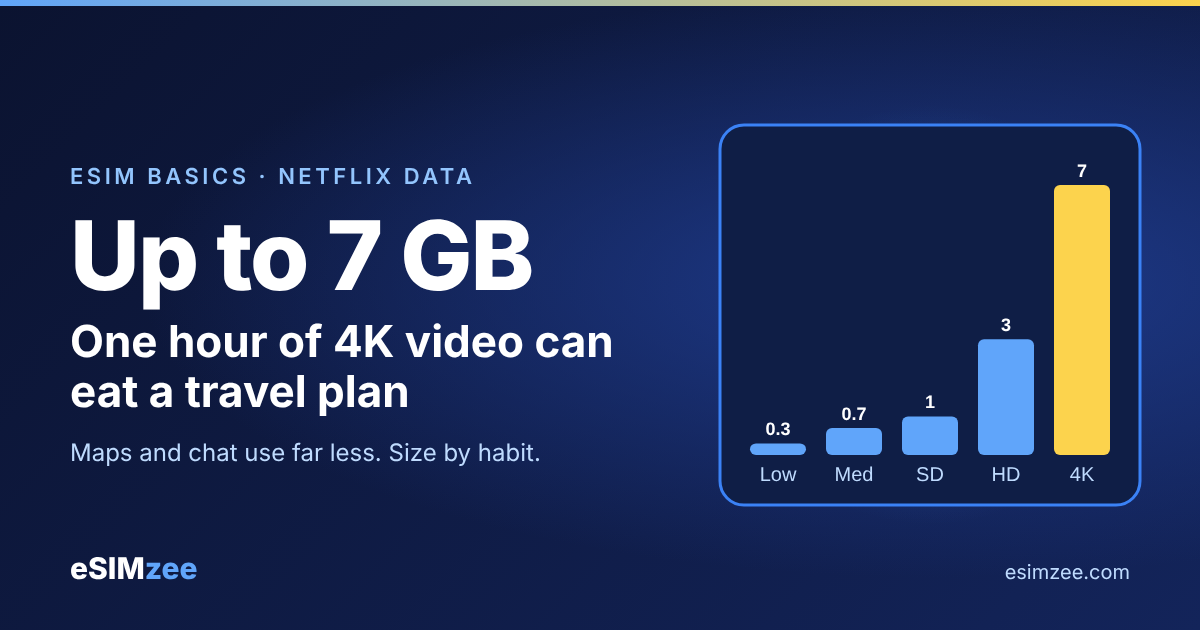
Video is the big one. Netflix publishes its own numbers: its help center lists up to 0.3 GB per hour on the Low setting and up to 0.7 GB on Medium. On High it lists up to 1 GB per hour in standard definition, up to 3 GB in HD and up to 7 GB in 4K.
Think of data like fuel. A map app sips it, and a video app drinks it. One evening of HD video can use more than a whole day of maps, chat and photos.
How do I find my own number?
Your phone already counts. On a Google Pixel, open Settings, then Network and Internet, then Internet, and tap the settings icon next to your operator. The Google Pixel Help page says your total shows at the top, and App data usage gives a per-app breakdown for any time period you pick.
Follow these steps:
- Look at your usage for a normal week at home.
- Remove what you do only on home Wi-Fi, such as big downloads.
- Multiply the daily figure by the number of days you will be away.
- Add a cushion, because travel means more maps, photos and rideshare apps.
The eSIMzee data calculator does this sum for you.
How much data does a light, medium or heavy traveler need?
Match your habits to one of these profiles, then pick a plan size that fits.
| Traveler type | What you do | Plan to choose |
|---|---|---|
| Light | Maps, messaging, email, a few photos. Hotel Wi-Fi for everything else. | A small fixed-data plan |
| Medium | Maps, social media, music, ride and food apps, some video calls. | A mid-size fixed-data plan |
| Heavy | Daily video streaming, hotspot for a laptop, remote work, cloud uploads. | A large plan or unlimited |
Choose unlimited if you stream video daily or share your connection with a laptop. Choose a fixed plan if you mostly use maps and chat. Read the fair-use terms on any unlimited plan before you buy.
How can I make my data last longer?
Three habits stretch a plan a long way.
- Download offline maps. Google Maps lets you save an area while you are online, and the Google Maps Help page shows the steps: search for a place, open More, and tap Download offline map.
- Turn on Low Data Mode on iPhone. Apple Support says it turns off Background App Refresh, reduces streaming quality, and switches off automatic downloads and backups.
- Set a data warning on Android. The Google Pixel Help page explains how to set a warning, so your phone alerts you when usage reaches a number you choose. A data limit switches mobile data off when you reach it.
Lower the video quality in streaming apps too. Netflix's own Low and Medium settings use a fraction of what High uses.
Does the length of my trip matter?
Length matters for validity, not for size. Every plan has a data amount and a number of days, and both must cover your trip. A big plan that expires on day 5 does not help on a 10-day trip.
Pick the number of days first. Then pick the data amount that fits your profile above. Compare options on your destination page, or use the eSIMzee compare tool to see plans side by side.
What if I run out of data?
Some travel eSIMs let you add more data, and some do not. Check the plan details before you buy. If a top-up is not offered, you buy a second plan, so a plan with a little extra data is safer than one that is just enough. Browse providers and their plans on the eSIMzee providers page.
Frequently asked questions
How much data do I need for a one-week trip?
It depends on your habits. Maps and messaging need little, and daily video needs much more. Measure a normal week on your phone and scale it to your trip.
Is 10 GB enough for two weeks?
For maps, messaging and social media with offline maps, it often is. If you stream video or use a hotspot, it can run out fast, because one hour of HD on Netflix can use up to 3 GB.
Should I buy unlimited?
Buy unlimited if you stream daily, work remotely or tether a laptop. Otherwise a fixed plan costs less. Check the fair-use limits first.
Does Wi-Fi at my hotel count toward my plan?
No. Data used over Wi-Fi does not come from your eSIM plan. Download large files and updates on Wi-Fi.
How do I see how much data I have used?
On a Pixel, open Network and Internet, then Internet, and check the total and the App data usage screen. Other phones use similar screens under mobile data settings.
Sources
- How to control how much data Netflix uses, Netflix Help Center, accessed 2026-11-03
- Reduce and manage mobile data usage, Google Pixel Help, accessed 2026-11-03
- Download areas and navigate offline, Google Maps Help, accessed 2026-11-03
- Use Low Data Mode on your iPhone and iPad, Apple Support, published 2025-10-15